|
HP-UX: Dynamically Extend Slash and/or Stand File Systems
(c) brokenribgolfer.com
Author: Mark Hopkins Email WhatsApp Date Published: 10.15.2005 Date Last Modified: 03.04.2026 (formatting)
On the HP-UX operating system it is often thought that we must either go through some elaborate
procedure to extend "/" and/or "/stand" file systems, or that it simply cannot be done at all. And
that such an elaborate procedure involves down time and restoring from Ignite-UX which in most cases
requires "after hours" work. In truth, the HP-UX file system is quite flexible,
perhaps due to the underlying and native Veritas "roots". Manipulating any (VXFS) file system under
HP-UX is very easy and can be accomplished dynamically if the system meets certain prerequisites.
The following procedure will examine these requirements and detail the process.
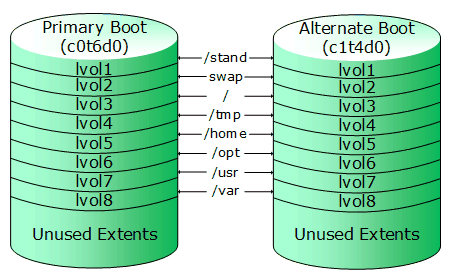
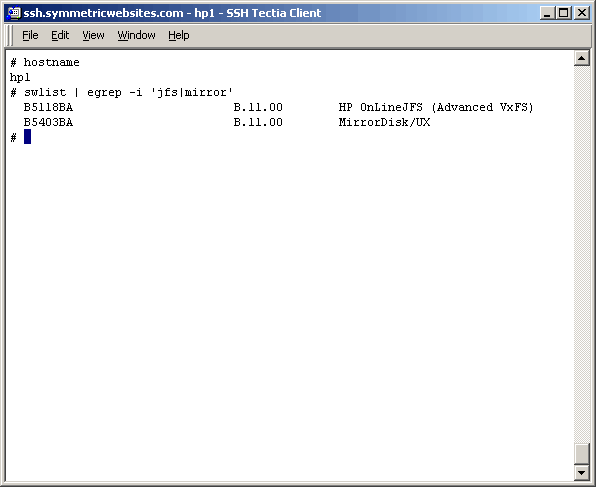
Assumptions The assumptions in our case will be that we are starting with a properly mirrored OS; mirrored across two identically sized physical disks, and that all logical volumes are mirrored. We can also assume that this system has been tested successfully booting from the primary boot disk as well as the alternate, but we will take a closer look in this procedure just to make sure. We are also going to assume that we really only want to extend "/". There should hardly ever be a need to extend "/stand". However, if /stand needs extending, this article can be used for instruction. The only difference, since /stand can be unmounted, is that OnLineJFS may be unnecessary. Requirements
The requirements for this exercise are really quite basic and most HP "shops" consider them as a "standard", but
nonetheless we will list them.
|
Architecture
|
|
Procedure
Now that we have laid the groundwork, let's get going with the actual steps. Remember that all we are really doing is (1) breaking all mirrors, (2) moving (pvmove) data to a place where it can be extended, (3) moving it back to where we started, and (4) establishing the mirrors.
NOTE: DO NOT PROCEED WITHOUT A FULL OS BACKUP! There are several ways and several products that
can be used to backup your Operating System. We prefer Ignite-UX, but there are others. OS image-level
backups are outside the scope of this article so we will not do one here. You certainly can assume that we
have protected ourselves prior to moving to the next steps of this exercise.
|
Command(s)
|
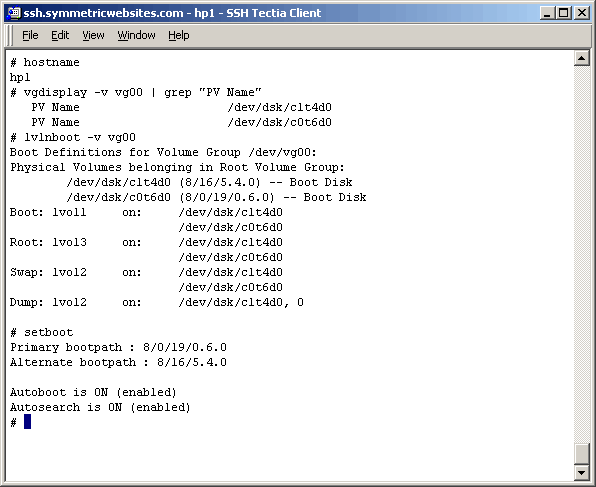
Command(s)
|
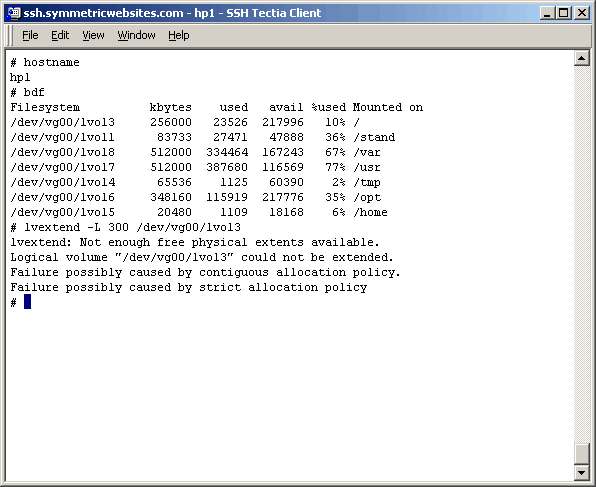
So how do we confirm that we have a problem extending the "/" file system? Let's try to extend it "as
is" and see what happens. The problem is exposed, but of course we already knew this didn't we?
Command(s)
|
|
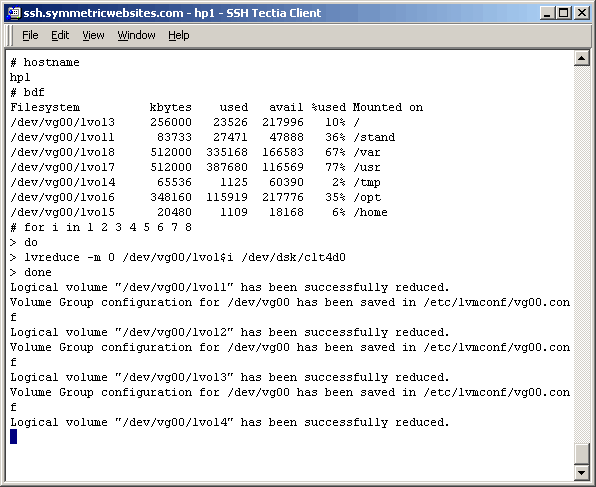
Break all mirrors as shown here. Note that the screen shot was taken before the operation completely
finished.
Command(s)
|
|
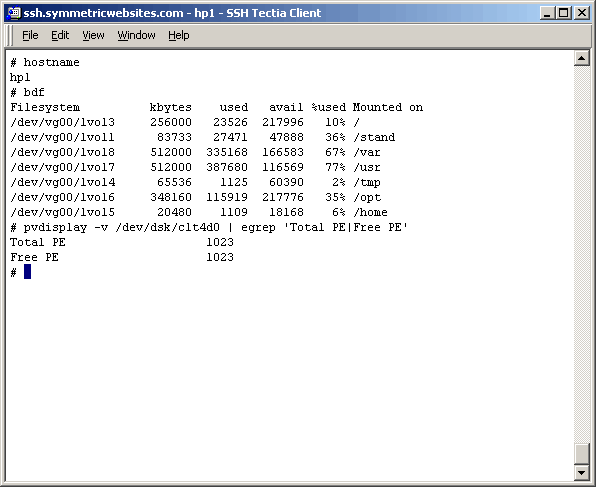
After all mirrors are broken, we expect the alternate boot disk to now be
empty. Verify this fact as shown here.
Command(s)
|
|
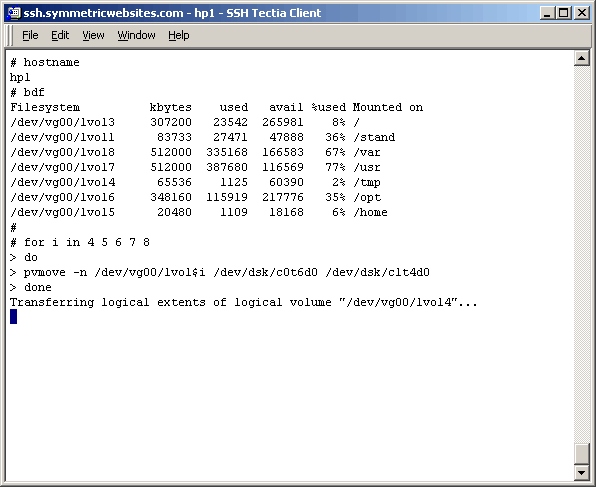
Now we begin the interesting part of this exercise. Recall that we are only interested in extending
"/" or lvol3. Since lvol3 has a strict/contiguous extent allocation policy we must put it somewhere
with available extents immediately following the logical volume itself. This part of the exercise
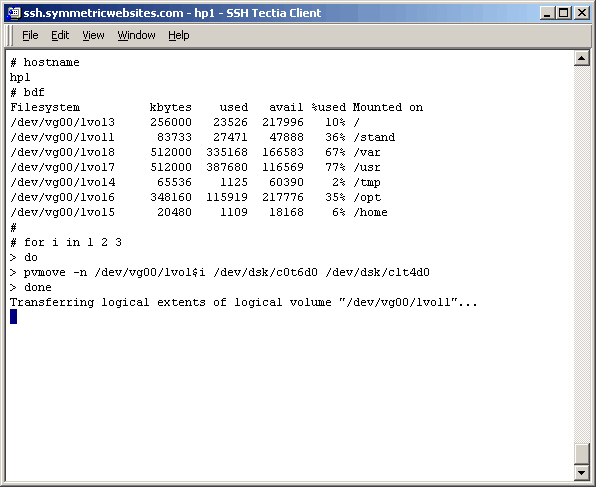
can probably be done any number of ways. Our way will be to move (pvmove) lvol1, lvol2, and lvol3
to the alternate boot disk, respectively. Logical volume lvol3 must be the last one moved. Again, please
note that we took the screenshot before the command completed.
Command(s)
|
|
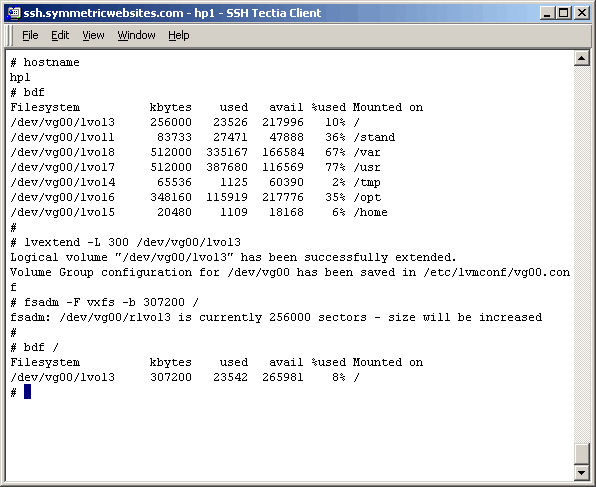
Now that we have moved lvol3 to a "good place" we can extend it as necessary. We have chosen to extend
it from 250MB to 300MB. Use lvextend and fsadm as shown. Notice we no longer get the error we
saw earlier, because there ARE now available extents immediately following lvol3.
Command(s)
|
|
It seems to us that at this point we will simply move (pvmove) the remaining logical volumes
to the alternate boot disk, appending them to the newly extended lvol3. Once there we can simply
mirror back to the primary boot disk. Again, the screenshot was taken before command completion.
Command(s)
|
|
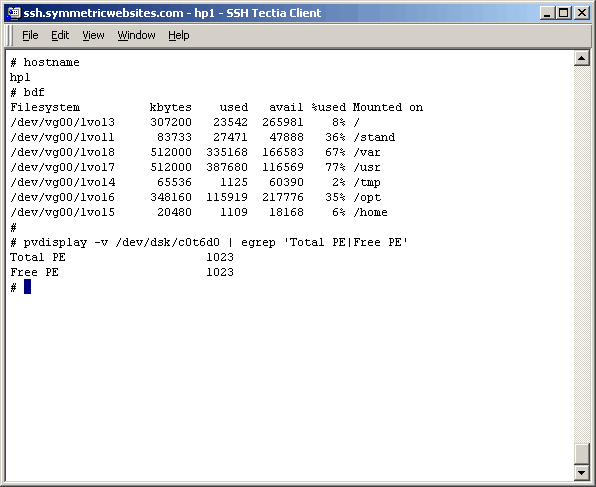
Now you should verify that the primary boot disk is actually empty as shown here.
Command(s)
|
|
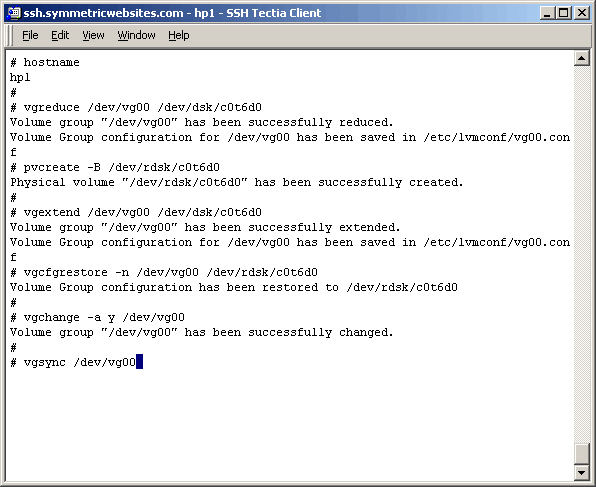
Now comes the "smoke and mirrors" part of the procedure. The intent is to
mirror all the logical volumes back to their original state and when completed, have a
perfectly bootable (primary and alternate) system. Of course the only difference that we
want to see is an extended "/" file system. We will not elaborate on the individual
commands used below, but if you are seasoned enough to follow this article that you should
have already had experience with all the commands. If not, look them up prior to their
execution. Here you can see that we remove the primary boot disk from the volume group,
re-initialize it and then bring it back into vg00.
Command(s)
|
|
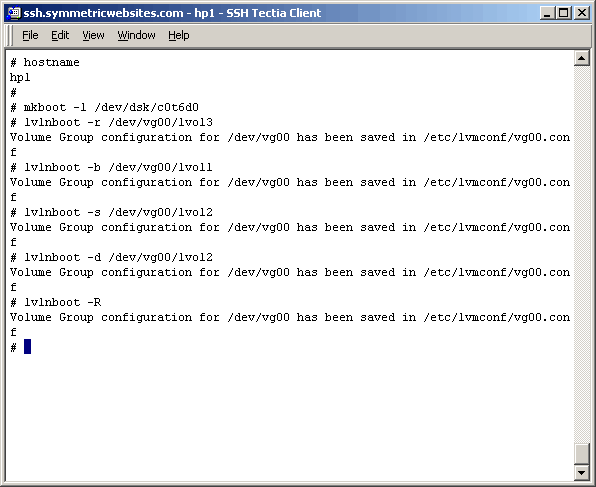
Continue preparing the primary boot disk.
Command(s)
|
|
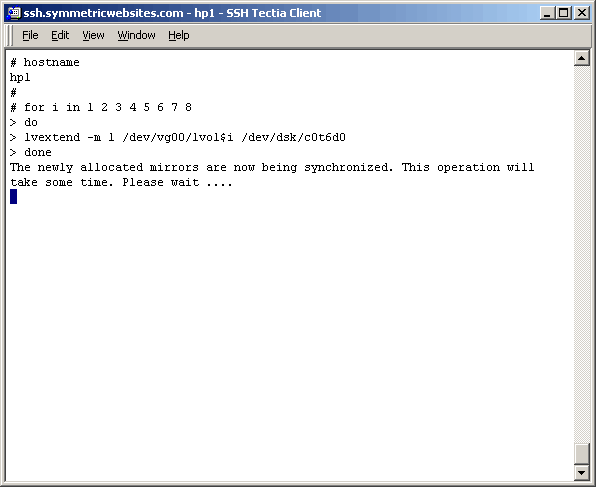
Now that the primary boot disk as back in vg00 and has been prepared, mirror all logical volumes
from the alternate boot disk to the primary boot disk as shown here.
Command(s)
|
|
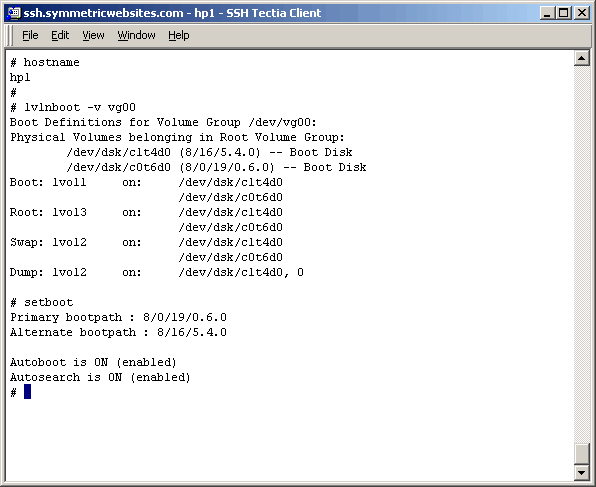
After the mirrors have been successfully created, re-execute the commands from above that check
out the boot configuration of vg00. It should look exactly as it did then.
Command(s)
|
|
NOTE: Now that you have completed this exercise, you will want to schedule
a reboot to test booting from both primary and alternate boot devices. Also it would not
hurt to get another image-level backup at this time since you have now changed the OS.
|
|
Conclusion
Well, there you have it! If you are not familiar with HP-UX disk layouts and the LVM command set, it
might seem a little complicated. But if you are comfortable with the concepts and commands, the only
slow part of this exercise will be waiting on particular commands (pvmove, lvextend) to complete.
|
|
Printing
As it turns out, as we are busy working on the HTML/CSS/php/Java Script formatting of our articles,
pretty printing is not yet possible. We are working on it at a low priority.
|