|
ISA Server 2000/2004: Real-Time Web Proxy Monitor
(c) Symmetric Web Sites, Inc. Author: Mark Hopkins Email Date: 01.26.2004
Would you like to view inbound and outbound web connections in "real-time"? With a combination of
Microsoft ISA Server 2000, Microsoft SQL Server Desktop Engine 2000 (MSDE 2000), and the .NET Framework,
it can be done. This article is packed with complete information and all source code is available for
download.
Background In what seems like a previous life I wrote "real-time" applications for the National Aeronautics And Space Administration (NASA), and before that for paper industry. So I have a fondness for viewing meaningful data "as it hapens" (or very shortly thereafter). This will suffice as a definition for "real-time" in this article. So please do not bombard me with other definitions of "real-time" because I a painfully aware of them. With this fondness for "real-time" applications and utilities, I tend to notice when certain products do not contain the functionality, like MS ISA Server 2000. Of course there are probably third party vendors out there who sell "real-time" monitoring add-on's but why buy when we can build it ourselves, rather easily, right? Assumptions An obvious assumption is that you are either running MS ISA Server 2000 or another firewall product that can redirect its web proxy log to MDSE 2000. I also assume that you have a solid understanding of all the technologies mentioned in this article such as networking, MS Windows Servers, MS ISA Server 2000, MDSE 2000, Windows XP, .Net Framework, C# and of course a text editor. Requirements My first design for this tool was at an enterprise level, utilizing MS Windows SQL Server 2000, and MS Windows Server 2003 Enterprise Server IIS 6. But that would limit the use of the article to those with access to similar resources, or would require others to scale down my effort to a smaller one. So after giving it a little thought I quickly realized that extremely minimal resources are necessary. So the "bare bones" minimum requirements are as follows:
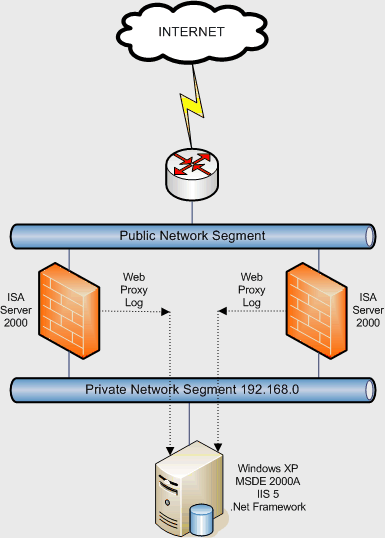
OK, I know what some of you are thinking. "What about Visual Studio .NET? Can we do this without our precious Integrated Development Environment (IDE)?" The answer is fun! Of course you can do it without that rather large piece of luggage (baggage). We are simply writing ASP.NET code with C# behind the scene. No need for anything other than a text editor (notepad will suffice), and your thinking cap!!!! Architecture The following diagram illustrates the configuration used in this article. It also depicts the "bare bones" requirements listed above. Of course I have other diagrams for more enterprise-centric configurations and would certainly share if asked, but they would be outside the scope (I love that phrase!) of this article. |
|
|
|
Procedure Now that I have laid the groundwork, we can talk about the components and how they work together and how to set them up. Of course I could assume that you are well versed in these (but I won't) and just throw the code at you, like so many authors. But it is our mission to give complete detailed information so let's get on with it. Database
We will need a data repository and I have chosen the "free" version of MS SQL Server called MSDE 2000, Release A.
This is the desktop version of SQL Server and runs on prety much every Microsoft operating system. From my experience
it runs VERY well on Windows XP Professional, which just happens to be what we are using. Rather than embedding
a ton of information in this article on the setup of MSDE 2000, or pointing to an external link for information,
it just so happens that I have written a rather extensive article on the subject myself. So if you require
help in this area, I refer you to
MDSE 2000 Release A: Setup And Configuration.
Connectivity
Now we have or ISA server(s) in place, and our data repository up and running. The next step is to direct our
ISA servers to send Web Proxy logs to the database server as opposed to whatever it is currently doing. This
involves a couple of steps. First, the database server MUST contain a properly formatted table in which to
store the data. Once again, in my article
MDSE 2000 Release A: Setup And Configuration this is covered.
Web Server
I am going to make an assumption here, so if it is a problem be sure to note it via feedback (below). Referring
to the diagram above, notice that the Windows XP Professional workstation is pretty much doing ALL of the work.
Capturing Web Proxy data, in my case, does not require a solution that will scale. This might be totally
different in your environment. For me, this workstation (733MHz processor, 1GB RAM, and a seperate disk for the
database) works just fine. However in a real production environment you would need much more horsepower. Also
notice the workstation is running Internet Information Server (IIS).
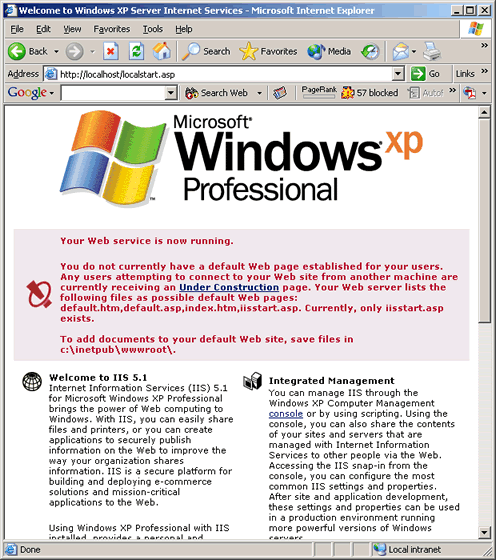
My assumption is that you have (or know how to) configure IIS on the workstation.
And that you have installed version 1.1 of the .Net Framework. If you have not installed these components, IIS
can be added through Start > Settings > Control Panel > Add or Remove Programs > Add/Remove Windows
Components. For IIS you will also need the Windows XP Professional CDROM. The .Net Framework can be installed
via Microsoft's
web site via Start > Windows Update. Even though IIS on Windows XP has the "one site" limitation it
will pose no problem for us.
|
|
|
|
IMPORTANT: It is very possible that even though you have IIS set up correctly AND have "instaled" the
.Net Framework that you still need to "initialize" the environment. If after you move my files to your web
server, you experience problems (like a completely blank browser screen while running this app), execute
the following command: Browser Support This application has been successfully tested against Microsoft Internet Explorer 6 and Netscape 7.1. Other browsers may yield undesirable results. If you are using a browser other than these two, I only have one thing to say, UPGRADE. The Code This brings us to the code which consists of two files. One contains the ASP.NET and C# code and the other is a an external Cascading Style Sheet (CSS) file. I am not going to talk about CSS at all in this article, but here is the contents of the file: RealTimeWebProxyMonitor.css |
br {

 line-height : 0.50;
}

body {

 background : #FFFFFF;
 color : #000000;
 margin : 0px 2px 0px 2px;
 padding : 0px;
}

table, form, tr, td, p {

 font-family : Verdana, Tahoma, Arial;
 margin : 0px 0px 0px 0px;
 padding : 0px;
 spacing : 0px;
}

a:link {

 font-family : Verdana, Tahoma, Arial;
 color : #0000FF;
 background : transparent;
 text-decoration : none;
}

a:visited {

 font-family : Verdana, Tahoma, Arial;
 color : #990099;
 background : transparent;
 text-decoration : none;
}

a:active {

 font-family : Verdana, Tahoma, Arial;
 color : #000000;
 background : transparent;
 text-decoration : none;
}

a:hover {

 font-family : Verdana, Tahoma, Arial;
 color : #000000;
 background : transparent;
 text-decoration : none;
}

td.normal {

 font-family : Verdana, Tahoma, Arial;
 font-size : 11px;
}
|
|
The following is the ASP.NET and C# code for this article. It is not commented; there really is no reason. It's all fairly standard stuff with a couple of exceptions, which I will discuss. If you have any questions and/or observations, please do not hesitate to contact me via article feedback. I do not profess to know everything and will always want to improve at whatever I do. As always, if you have comments that lead to a change on this code or article, I will give you the credit. RealTimeWebProxyMonitor.aspx |
<%@ page language = "C#" %>

<%@ Import Namespace = "System" %>
<%@ Import Namespace = "System.Data" %>
<%@ Import Namespace = "System.Data.SqlClient" %>

<script runat="server" language="C#">

  private void Page_Load (Object Sender, EventArgs e) {

    copyright.Text = "<a href='http://www.SymmetricWebSites.com'>" +
                     "(c) Symmetric Web Sites, Inc.</a>";

    Title.Text = "<br />Real-Time Web Proxy Monitor<br /><br />";

    copyright.Visible = true;

    Title.Visible = true;

    sDate.Text = DateTime.Now.ToLongTimeString ();

    sDate.Visible = true;

    string conStr = "server   = dev1;" +
                    "database = ISA2000;" +
                    "uid      = isa2000User;" +
                    "pwd      = isaPassword";

    string selCmd = "SELECT TOP 25 ClientIP Client, DestHost Destination, " +
                                  "SQLserverDateTime TimeStamp, " +
                                  "ServerName Firewall " +
                    "WHERE NOT (ClientIP  LIKE '192.168.0.%' AND " +
                               "DestHost LIKE '%mjfs.ddns.net') AND " +
                               "ClientIP != '68.23.121.17' AND " +
                               "ClientIP != '68.23.121.21' AND " +
                               "ClientIP != '192.168.0.44' AND " +
                               "ClientIP != '192.168.0.14' " +
                    "ORDER BY SQLserverDateTime " +
                    "DESC";

    SqlConnection myConnection = new SqlConnection (conStr);

    SqlDataAdapter myCommand = new SqlDataAdapter (selCmd, myConnection);

    DataSet ds = new DataSet ();

    myCommand.Fill (ds,"Table");

    dataGrid1.DataSource = ds;

    dataGrid1.DataBind ();
  }

</script>

<head>

  <meta http-equiv = "refresh" content = "5">

  <link rel  = "styleSheet"
        type = "text/css"
        href = "RealTimeWebProxyMonitor.css" />

  </style>

</head>

<form runAt = "server">

  <table border      = "0"
         cellSpacing = "2"
         cellPadding = "0"
         width       = "100%">

    <tr>

      <td class = "normal" width = "33%">

        <asp:label id          = "copyright"
                   runAt       = "server"
                   font-name   = "verdana"
                   font-size   = "12px"
                   font-weight = "bold"
                   visible     = "false" />

      </td>

      <td class = "normal" width = "34%" align = "center">

        <asp:label id          = "Title"
                   runAt       = "server"
                   font-name   = "verdana"
                   font-size   = "12px"
                   font-weight = "bold"
                   visible     = "false" />

      </td>

      <td class = "normal" align = "right">

        <asp:label id          = "sDate"
                   runAt       = "server"
                   font-name   = "verdana"
                   font-size   = "12px"
                   font-weight = "bold"
                   visible     = "false" />

      </td>

    </tr>

    <tr>

      <td colspan = "3" align = "center">

        <asp:dataGrid id                             = "dataGrid1"
                      runAt                          = "server"
                      alternatingItemStyle-backColor = "lightGray"
                      autoGenerateColumns            = "true"
                      backColor                      = "white"
                      borderColor                    = "black"
                      cellPadding                    = "2"
                      cellSpacing                    = "0"
                      enableViewState                = "false"
                      font-name                      = "verdana"
                      font-size                      = "10pt"
                      gridLines                      = "none"
                      headerstyle-backColor          = "#0099CC"
                      headerstyle-font-Size          = "14pt"
                      headerstyle-font-Style         = "bold"
                      headerstyle-foreColor          = "black"
                      itemStyle-font-name            = "verdana"
                      showFooter                     = "false"
                      Width                          = "100%" />

        </asp:dataGrid>

      </td>

    </tr>

  </table>

</form>
|
NOTE #1: This code produces a web page that refreshes every 5 seconds. That interval can easily be changed. For those who may be unfamiliar, simply modify the following statement from the code above: |
<meta http-equiv = "refresh" content = "5"> |
|
NOTE #2: It should be fairly obvious that the SQL/MSDE connection string is "hard coded" and site specific. You will most likely be using different authentication, and there are ways to avoid hard coding the string, however those ways are outside the scope of this article. |
string conStr = "server   = dev1;" +
                "database = ISA;" +
                "uid      = isaUser;" +
                "pwd      = isaPassword";
|
|
NOTE #3: The following SQL SELECT statement is very site and user specific. Once again hard coded for convenience (of this article). I found that that I did not want to see everything that passed through the firewal (ISA Server) so I excluded certain addresses. A better way to accomplish this would be to incorporate selectable filters into the app. If I get around to doing this I will either modify this article of write a short update to it talking about filter implementation. In any case you will want to modify the select statement below. |
string selCmd = "SELECT TOP 25 ClientIP, DestHost, ServerName " +
                "FROM WebProxyLog " +
                "WHERE NOT (ClientIP  LIKE '192.168.0.%' AND " +
                           "DestHost LIKE '%mjfs.ddns.net') AND " +
                           "ClientIP != '68.23.121.17' AND " +
                           "ClientIP != '68.23.121.21' AND " +
                           "ClientIP != '192.168.0.44' AND " +
                           "ClientIP != '192.168.0.14' " +
                "ORDER BY SQLserverDateTime " +
                "DESC";
|
|
Puting It All Together
The only remaing task is to copy the two files to a web server and test it. A good way to do this is
to first create a directory under wwwroot. I used the following comand:
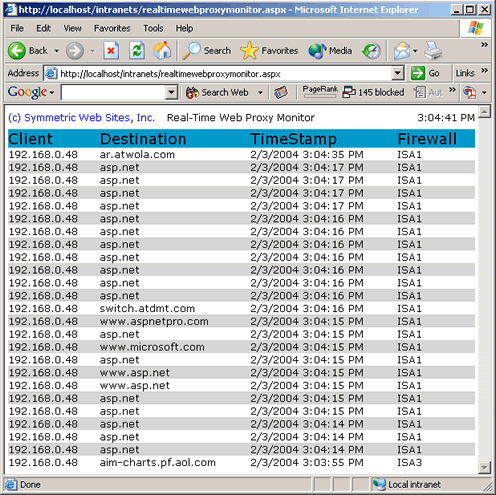
Screen Shot Below is a screen shot of the Real-Time Web Proxy Monitor. It is not pictured to show any particularly relavent information, rather just to show the reader what to expect. This is the only output the application produces. However, it could easily be expanded to do more. |
|
|
|
Summary
I have barely scratched the surface of possibilities with this article. Microsoft ISA Server 2000, like every
firewall that I have seen, can-does-must capture a myriad of data including firewall, web proxy and packet
filter. If stored in a relational database a wealth of useful information reporting can be accomplished,
thus becoming an invaluable trouble-shoting tool.
Updated For MS ISA Server 2004 Beta 2 Oh no! Just when I thought we were finished, Microsoft releases ISA Server 2004 Beta 2, and it is actually stable. Yikes! Well, since I have implemented the new version obviously I needed to tie it in with the Real-Time Web Proxy Monitor. However, when I attempted to send the web proxy log to MSDE 2000, I received an error. I should have known better, of course. I knew what the problem was even before looking at the error log. The database table format has changed. Actually the table is just bigger by a few columns, as shown below: |
|
[rule] nvarchar(128), [FilterInfo] nvarchar(128), [SrcNetwork] nvarchar(128), [DstNetwork] nvarchar(128), [ErrorInfo] int |
|
If you plan to have ISA Server 2004 store web proxy data to you MSDE database, you will need to alter the repository table structure. I will not cover this procedure in this article. For detailed information please refer to MDSE 2000 Release A: Setup And Configuration. |